



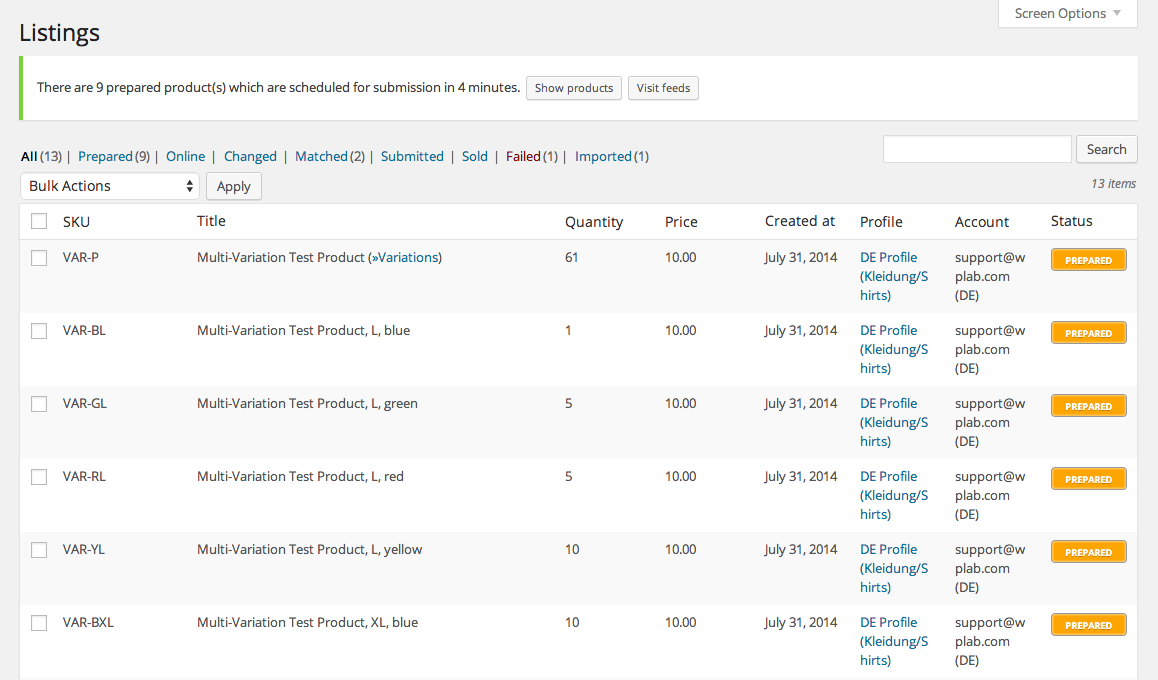

WPLab | WP-Lister Pro for Amazon
In the ever-evolving world of e-commerce, businesses are constantly seeking ways to streamline their operations and maximize their reach. One of the most effective ways to achieve this is by integrating your online store with major marketplaces like Amazon. This is where the WPLab | WP-Lister Pro for Amazon plugin comes into play. This powerful tool allows WordPress users to seamlessly list their products on Amazon, manage their inventory, and synchronize their sales data. In this article, we will delve into the features, benefits, and usage of WP-Lister Pro for Amazon.
Key Features of WP-Lister Pro for Amazon
WP-Lister Pro for Amazon offers a plethora of features designed to make the process of listing and managing products on Amazon as smooth as possible. Here are some of the key features:
- Seamless Integration: Easily connect your WooCommerce store with Amazon.
- Bulk Listing: List multiple products on Amazon with just a few clicks.
- Inventory Synchronization: Keep your inventory levels in sync between WooCommerce and Amazon.
- Order Management: Import Amazon orders into WooCommerce for centralized order processing.
- Automatic Price Adjustments: Set rules for automatic price adjustments based on various criteria.
- Custom Templates: Create custom listing templates to match your brand’s style.
- Product Variations: Support for product variations, such as size and color.
- Advanced Reporting: Generate detailed reports on your Amazon sales performance.
Benefits of Using WP-Lister Pro for Amazon
Using WP-Lister Pro for Amazon offers numerous benefits for online store owners. Here are some of the most significant advantages:
- Increased Reach: By listing your products on Amazon, you can tap into a vast customer base and increase your sales potential.
- Time Savings: The plugin automates many of the tedious tasks associated with listing products on Amazon, saving you valuable time.
- Improved Accuracy: With inventory synchronization, you can avoid overselling and ensure that your stock levels are always accurate.
- Centralized Management: Manage all your orders from both WooCommerce and Amazon in one place, simplifying your workflow.
- Enhanced Control: Customizable templates and automatic price adjustments give you greater control over how your products are presented and priced on Amazon.
How to Use WP-Lister Pro for Amazon
Getting started with WP-Lister Pro for Amazon is straightforward. Follow these steps to set up and use the plugin:
1. Install and Activate the Plugin
- Purchase WP-Lister Pro for Amazon from the WPLab website.
- Download the plugin file and upload it to your WordPress site via the Plugins menu.
- Activate the plugin once it is installed.
2. Connect to Your Amazon Seller Account
- Navigate to the WP-Lister Pro for Amazon settings page.
- Click on the “Connect to Amazon” button.
- Follow the prompts to authorize the connection between your WooCommerce store and your Amazon seller account.
3. Configure Your Settings
- Go to the settings page and configure your preferences, such as inventory synchronization, pricing rules, and order management options.
- Create custom listing templates if desired.
4. List Your Products
- Go to the Products page in your WordPress dashboard.
- Select the products you want to list on Amazon.
- Click on the “List on Amazon” button and follow the prompts to complete the listing process.
5. Manage Your Listings and Orders
- Monitor your listings and make any necessary adjustments from the WP-Lister Pro for Amazon dashboard.
- Import and manage your Amazon orders from within WooCommerce.
Advanced Features and Tips
WP-Lister Pro for Amazon also offers several advanced features that can help you optimize your Amazon listings and sales. Here are some tips for making the most of these features:
1. Use Custom Templates
Creating custom listing templates allows you to maintain a consistent brand image across all your Amazon listings. You can include specific formatting, images, and descriptions that align with your brand’s style.
2. Set Up Automatic Price Adjustments
With automatic price adjustments, you can set rules to dynamically adjust your product prices based on factors such as competitor pricing, stock levels, and sales performance. This can help you stay competitive and maximize your profits.
3. Monitor Inventory Levels
Keeping your inventory levels in sync between WooCommerce and Amazon is crucial to avoid overselling and stockouts. Regularly monitor your inventory levels and set up alerts to notify you when stock is running low.
4. Analyze Sales Performance
Use the advanced reporting features to generate detailed reports on your Amazon sales performance. Analyze these reports to identify trends, track your progress, and make data-driven decisions to improve your sales strategy.
Common Issues and Troubleshooting
While WP-Lister Pro for Amazon is designed to be user-friendly, you may encounter some common issues during setup and usage. Here are a few troubleshooting tips:
1. Connection Issues
If you are having trouble connecting your WooCommerce store to your Amazon seller account, double-check your credentials and ensure that you have authorized the connection correctly. If the issue persists, contact WPLab support for assistance.
2. Listing Errors
If you encounter errors while listing products on Amazon, review the error messages provided and make any necessary adjustments to your product data. Common issues include missing required fields, incorrect formatting, and duplicate listings.
3. Inventory Sync Problems
If your inventory levels are not syncing correctly between WooCommerce and Amazon, ensure that you have configured the synchronization settings properly. Check for any conflicts with other plugins that may be affecting the sync process.
Conclusion
WP-Lister Pro for Amazon is an invaluable tool for WooCommerce store owners looking to expand their reach and streamline their operations. With its robust features, seamless integration, and user-friendly interface, it simplifies the process of listing and managing products on Amazon. By leveraging the power of WP-Lister Pro for Amazon, you can save time, increase your sales potential, and achieve greater control over your e-commerce business.
Whether you are a seasoned Amazon seller or just getting started, WP-Lister Pro for Amazon provides the tools and support you need to succeed in the competitive world of online retail. So why wait? Take your WooCommerce store to the next level with WP-Lister Pro for Amazon today!


