Generic filters
Automatic updates Yes
Version 1.5.6
Updated on
Virus Total See Report

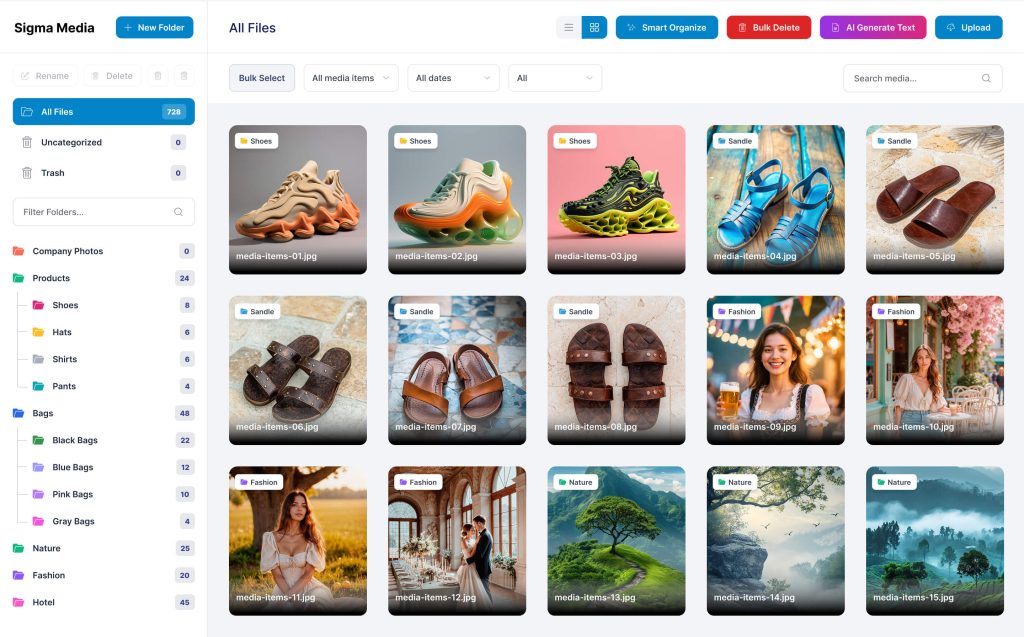
The BdThemes | Sigma Media Manager is a robust, intuitive plugin for WordPress. It enhances media handling, offering seamless, efficient management. With its user-friendly interface, it supports diverse file types, ensuring swift, organized access. Elevate your website's media capabilities, streamline operations, and enjoy unparalleled convenience with this indispensable tool.

How to download BdThemes | Sigma Media Manager

Unlimited Access

Subscribe for only €10.90

Or

Get this product only with unlimited updates

Already included languages : EN

We are not affiliated with BdThemes | Sigma Media Manager nor its developers or owners. Please read the full disclaimer in footer.

HOW IT WORKS

Auto updates with Club WPress plugin

Check how to install and update your WordPress plugins and themes in ONE CLICK directly from your Dashboard.

ClubWordPress Updater Plugin

Core Features of BdThemes | Sigma Media Manager

  • Media Library Management: Organize and manage your media files efficiently.
  • Drag and Drop Interface: Easily upload and arrange media files with a simple drag and drop feature.
  • Advanced Search: Quickly find media files using advanced search options.
  • Folder Organization: Create and manage folders to categorize your media files.
  • Bulk Actions: Perform actions on multiple media files at once to save time.
  • File Type Support: Supports a wide range of media file types including images, videos, and audio files.
  • Responsive Design: Fully responsive and works seamlessly on all devices.
  • Integration: Easily integrates with other WordPress plugins and themes.
  • User Permissions: Set user permissions to control access to media files.
  • SEO Optimization: Optimize media files for better search engine visibility.
  • Customizable Settings: Tailor the plugin settings to suit your specific needs.
  • Regular Updates: Receive regular updates to ensure compatibility and security.

List of improvements in BdThemes | Sigma Media Manager version 1.5.6

  • = 1.5.6 [18th June 2026] =
  • ### Fixed

  • Media library: folder sidebar now appears in the Elementor image/media picker modal (same folder tree as Gutenberg and the block editor)
  • Media library: media modal folder integration loads correctly in Elementor, which uses `wp_enqueue_scripts` instead of `admin_enqueue_scripts`
  • Media library: improved media modal folder sidebar reliability with deferred `wp.media` initialization and DOM observation for late-loaded modals
  • = 1.5.5 [17th June 2026] =
  • ### Fixed

  • Media library: modal dialogs (Delete Unused, Smart Organize, Bulk Generate, and Optimize) now render above the WordPress admin menu in Safari
  • = 1.5.4 [16th June 2026] =
  • ### Fixed

  • Settings: REST API requests now use the correct path when WordPress is installed in a subdirectory (fixes save failures that returned a 404 HTML page from the main site)
  • Settings: API client resolves REST URLs dynamically per request so cached admin pages do not send requests to the wrong host
  • Settings: clearer error when the server returns a 404 HTML page instead of JSON
  • = 1.5.3 [15th June 2026] =
  • ### Added

  • Media library: chunked usage-scan API for large sites (`usage-scan/start`, `usage-scan/step`, and paginated `usage-scan/unused` REST endpoints)
  • Media library: cached attachment usage results (24 hours) with automatic invalidation when media is uploaded, deleted, trashed, restored, or post content changes
  • Media library: automatic background usage-scan jobs rebuild the cache after content changes or when the 24-hour cache expires (WP-Cron)
  • Settings > General > Background Jobs: toggle to enable or disable automatic Delete Unused background scans (manual scans still work when off)
  • ### Security

  • Document Library: public API responses no longer expose direct download URLs for password-protected items; downloads are routed through the secure-download endpoint after verification
  • Document Library: password hashes are removed from public library and folder REST responses (only `has_password` is returned)
  • Document Library: added secure-download by attachment ID for folder-linked libraries so library-level password protection works without exposing direct file URLs
  • OneDrive and pCloud: serve proxy endpoints now require a signed URL, a published parent post, or appropriate user capability—preventing unauthenticated bulk access by attachment ID
  • ### Fixed

  • Media library: Delete Unused and Attached/Unattached filters no longer cause 504 Gateway Timeout errors on large media libraries
  • Media library: usage scan runs in small batches per request with real progress in the Delete Unused modal instead of one long-running request
  • Media library: improved usage-scan performance (bulk URL lookup, cursor-based database pagination, optimized URL matching)
  • Media library: usage scan no longer stalls on WooCommerce and other meta-heavy sites—bootstrap is split into chunked numeric meta, gallery meta, and text-column steps with smaller postmeta batch sizes
  • Media library: scan progress is persisted in the options table with a leaner session payload so large libraries do not lose scan state between batches
  • Media library: generated CSS under uploads is scanned instead of walking the full theme directory tree during usage scans
  • Media library: Delete Unused progress now shows the active step and batch number while scanning
  • Media library: usage-scan step requests retry automatically with a short delay to reduce failures from security plugins and rate limiting (e.g. Wordfence)
  • Media library: in-progress usage scans can resume instead of restarting from scratch when a session is still valid
  • Media library: clearer API error when the server returns an HTML timeout page instead of JSON
  • Media library: fixed plugin fatal error on load when registering usage-scan cache invalidation hooks
  • Media library: Delete Unused Start Scan now reuses cached results instead of forcing a full rescan on every click
  • Media library: Delete Unused shows a confirmation dialog before moving items to trash, with backup and scan-limitation warnings
  • Media library: Delete Unused scan progress UI no longer shows a misleading step counter during cached loads
  • Media library: fixed automatic background usage scans not being scheduled after post saves or when media was trashed or restored (cache was cleared but WP-Cron jobs were not queued)
  • Settings: re-enabling Background Jobs now schedules the 24-hour cache refresh when a valid scan cache already exists
  • Document Library: password-protected downloads now work after unlock—signed unlock tokens bridge the frontend and secure-download endpoint, and cloud-offloaded files are served when local copies are removed
  • Document Library: Captcha providers reset after a failed unlock attempt so a fresh captcha is required instead of reusing an already-consumed token
  • White label: settings sidebar license status badge is now hidden when Hide License Tab is enabled
  • = 1.5.2 [10th June 2026] =
  • ### Fixed

  • Media library: Attached to posts and Unattached filters now work correctly inside folders and Cloud Offload (previously only applied on All Files)
  • = 1.5.1 [8th June 2026] =
  • ### Fixed

  • Gemini AI text generation (captions, titles, alt text, and descriptions) now uses `gemini-2.5-flash` instead of the discontinued `gemini-2.0-flash` model
...
>

Join Club WPress Now !

Get access to 19500 products for only €10,90 per month.

JOIN NOW

Reviews