Generic filters
Automatic updates Yes
Version 1.4.3
Updated on
Virus Total See Report

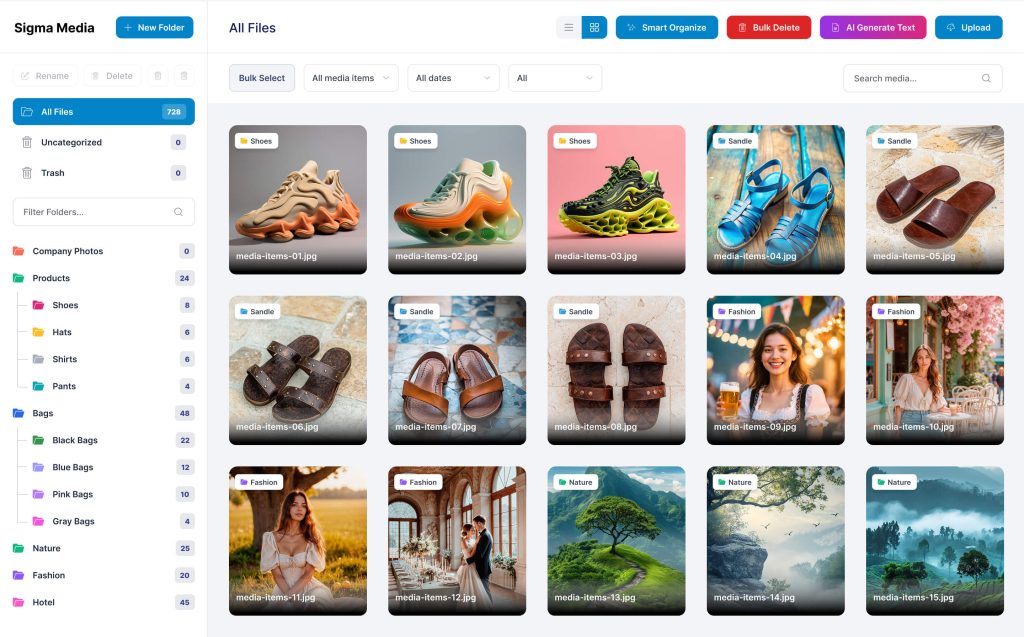
The BdThemes | Sigma Media Manager is a robust, intuitive plugin for WordPress. It enhances media handling, offering seamless, efficient management. With its user-friendly interface, it supports diverse file types, ensuring swift, organized access. Elevate your website's media capabilities, streamline operations, and enjoy unparalleled convenience with this indispensable tool.

How to download BdThemes | Sigma Media Manager

Unlimited Access

Subscribe for only €10.90

Or

Get this product only with unlimited updates

Already included languages : EN

We are not affiliated with BdThemes | Sigma Media Manager nor its developers or owners. Please read the full disclaimer in footer.

HOW IT WORKS

Auto updates with Club WPress plugin

Check how to install and update your WordPress plugins and themes in ONE CLICK directly from your Dashboard.

ClubWordPress Updater Plugin

Core Features of BdThemes | Sigma Media Manager

  • Media Library Management: Organize and manage your media files efficiently.
  • Drag and Drop Interface: Easily upload and arrange media files with a simple drag and drop feature.
  • Advanced Search: Quickly find media files using advanced search options.
  • Folder Organization: Create and manage folders to categorize your media files.
  • Bulk Actions: Perform actions on multiple media files at once to save time.
  • File Type Support: Supports a wide range of media file types including images, videos, and audio files.
  • Responsive Design: Fully responsive and works seamlessly on all devices.
  • Integration: Easily integrates with other WordPress plugins and themes.
  • User Permissions: Set user permissions to control access to media files.
  • SEO Optimization: Optimize media files for better search engine visibility.
  • Customizable Settings: Tailor the plugin settings to suit your specific needs.
  • Regular Updates: Receive regular updates to ensure compatibility and security.

List of improvements in BdThemes | Sigma Media Manager version 1.4.3

  • = 1.4.3 [19th May 2026] =
  • ### Added

  • White label (Agency, Extended, Developer, and eligible WL licenses): rebrand the Media Manager admin menus with a custom title, optional menu icon, and settings header logo
  • White label options to hide the License tab in settings and to hide plugin admin menus for client delivery, with a signed recovery link emailed to the license holder (localhost shows a preview URL after save)
  • Recovery token revoke control in white label settings
  • ### Fixed

  • Fixed image editor saving much larger files after Gemini AI edits
  • = 1.4.2 [17th May 2026] =
  • ### Added

  • Document Library admin: drag-and-drop custom item order in grid and list (saved per folder; set Sort By to Custom Order on the library for the public view)
  • Document Library display settings per library: optional title shortening with configurable character limit, and optional filename display under the title
  • ### Improved

  • Document Library list view: name, type, size, date, and download columns now align correctly with their headers
  • Multisite license admin: faster site list loading when choosing which subsites use the network license
  • License status checks in the admin: browser-side caching with background refresh so license pages load faster between visits
  • Media library toolbar: bulk action buttons (Duplicate, Download, Generate Text, Move to folder, Move to Trash, Optimize Media, and others) use solid colors instead of gradients
  • Bulk rename / AI generate modal: AI Operation tab uses a solid color instead of a gradient when active
  • Media library file sort moved to the main toolbar next to Bulk Select (hover submenus for ascending/descending, same options as before)
  • Sidebar folder sort opens By Name, By Date, and Count directly on click (removed the extra Sort Folders step)
  • Document Library admin grid reorder: drag any card to move it (no drag-handle icon on thumbnails)
  • Media library and Document Library admin list views: Word documents (.doc, .docx, .odt, .rtf) show type as `application/document` instead of long vendor MIME strings
  • List view Type column widened so MIME labels (e.g. `application/document`, `application/pdf`) display in full without ellipsis
  • ### Fixed

  • Multisite network license caching: stale or repeated license validation no longer causes slow admin pages or incorrect active/inactive status after activation, deactivation, or changing licensed subsites
  • License REST requests pinned to the current site URL so cached admin pages do not trigger cross-origin errors on multisite or alternate domains
  • Document Library list view layout where type, size, and date stacked vertically instead of lining up under column headers
  • Document Library settings save on existing sites when new display option columns are added to the database
  • Document Library admin grid reorder not working on image thumbnails (browser native image drag blocked custom sorting)
  • Document Library admin file-upload drop zone conflicting with drag-to-reorder in the same folder view
  • = 1.4.1 [14th May 2026] =
  • ### Improved

  • PDF & EPUB cover thumbnails in the Document Library
  • = 1.4.0 [13th May 2026] =
  • ### Added

  • Smart Organize now intelligently organizes media
  • Media files used in posts/pages are organized into folders named after the post title
  • Unused media continues to be organized by type (Images, Videos, Audio, Documents)
  • “Duplicate file” action in media preview modal for quick single-item duplication
  • “Duplicate” bulk action button in the media toolbar for selected items
  • OpenRouter added as a new AI provider option in AI Settings
  • Attachment alt text updates sync to posts and pages where that image is embedded
  • AI metadata language setting in AI Settings
  • FileBird & WP Media Folder migration: Import copies the folder hierarchy and media assignments
  • EPUB (ebook) file upload support across Media Manager and Document Library
  • Multisite license system for WordPress multisite (network-level license activation and management)
  • Backup Files browser in Tools & Backup for reviewing and downloading local optimization restore files, cloud backup copies, and valid untracked files in `uploads/smm-backups`
  • ### Fixed

  • Document attachments now show a simple “document” style label in file details for Word and similar office files (DOC, DOCX, ODT, RTF)
  • File size no longer shows as zero when a file lives only in the cloud after you chose to delete the local copy
  • Bulk Cloud Offload: the summary cards and successful count now match what really happened
...
>

Join Club WPress Now !

Get access to 19346 products for only €10,90 per month.

JOIN NOW

Reviews