




WooCommerce AutomateWoo Refer A Friend
In the ever-evolving world of e-commerce, businesses are constantly seeking innovative ways to enhance customer engagement, boost sales, and expand their reach. One powerful tool that has gained significant traction is the WooCommerce AutomateWoo Refer A Friend plugin. This plugin leverages the power of word-of-mouth marketing by incentivizing customers to refer friends and family to your online store. In this article, we will delve into the features, benefits, and implementation of the WooCommerce AutomateWoo Refer A Friend plugin.
Features of WooCommerce AutomateWoo Refer A Friend
The WooCommerce AutomateWoo Refer A Friend plugin is packed with a range of features designed to make referral marketing seamless and effective. Here are some of the key features:
- Customizable Referral Campaigns: Create and manage multiple referral campaigns with ease. Customize the referral messages, rewards, and conditions to suit your business needs.
- Automated Workflows: Automate the entire referral process, from sending referral invitations to tracking referrals and rewarding customers.
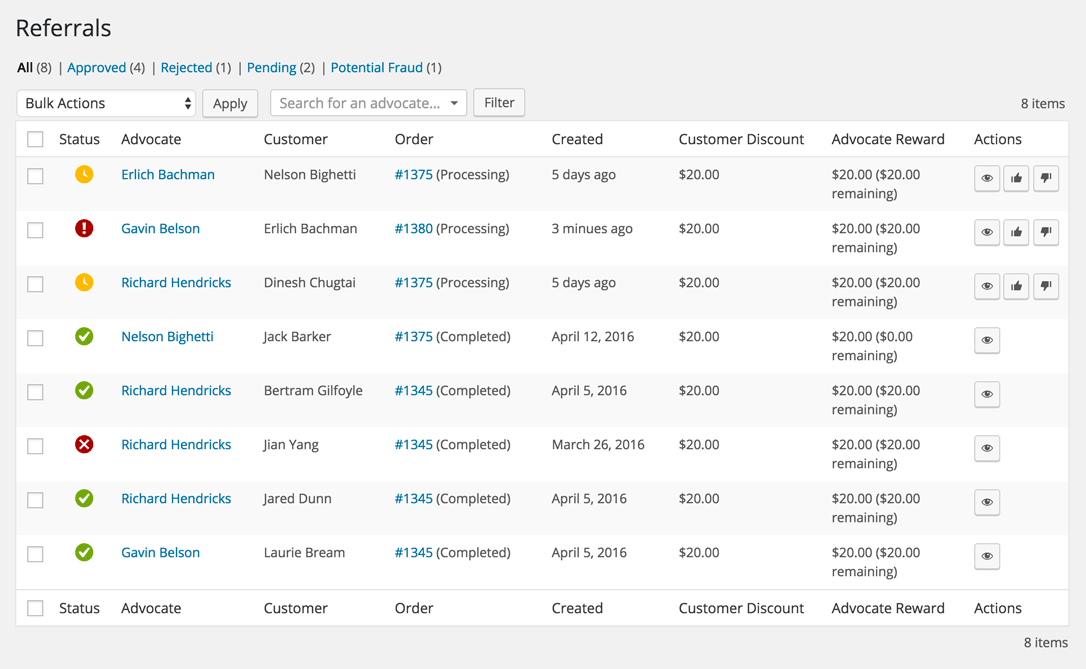
- Referral Tracking: Track referrals in real-time and monitor the performance of your referral campaigns. Gain insights into which customers are driving the most referrals.
- Flexible Rewards: Offer a variety of rewards to both the referrer and the referred customer, such as discounts, coupons, or store credits.
- Integration with WooCommerce: Seamlessly integrate the plugin with your WooCommerce store, ensuring a smooth and consistent user experience.
- Email Notifications: Keep customers informed with automated email notifications at every stage of the referral process.
- Referral Links: Generate unique referral links for customers to share with their friends and family.
- Referral Widgets: Add referral widgets to your website, making it easy for customers to refer others directly from your site.
Benefits of Using WooCommerce AutomateWoo Refer A Friend
Implementing the WooCommerce AutomateWoo Refer A Friend plugin can bring a multitude of benefits to your e-commerce business:
- Increased Customer Acquisition: Leverage the power of word-of-mouth marketing to acquire new customers at a lower cost compared to traditional advertising methods.
- Enhanced Customer Loyalty: Rewarding customers for referring others fosters a sense of loyalty and encourages repeat purchases.
- Higher Conversion Rates: Referrals from friends and family are more likely to convert into paying customers, resulting in higher conversion rates.
- Cost-Effective Marketing: Referral marketing is a cost-effective way to expand your customer base without significant advertising expenses.
- Improved Customer Engagement: Engaging customers through referral programs keeps them actively involved with your brand, leading to increased engagement and interaction.
- Valuable Insights: Gain valuable insights into customer behavior and referral patterns, allowing you to optimize your marketing strategies.
Setting Up WooCommerce AutomateWoo Refer A Friend
Setting up the WooCommerce AutomateWoo Refer A Friend plugin is a straightforward process. Follow these steps to get started:
- Install and Activate the Plugin: Begin by installing and activating the WooCommerce AutomateWoo plugin from the WordPress plugin repository.
- Configure General Settings: Navigate to the AutomateWoo settings and configure the general settings, including email notifications, referral rewards, and campaign settings.
- Create Referral Campaigns: Create referral campaigns by defining the referral message, rewards, and conditions. Customize the campaign to align with your business goals.
- Set Up Referral Workflows: Automate the referral process by setting up workflows. Define triggers, actions, and conditions to ensure a seamless referral experience.
- Generate Referral Links: Generate unique referral links for your customers to share. These links will track referrals and attribute them to the respective referrers.
- Add Referral Widgets: Enhance the visibility of your referral program by adding referral widgets to your website. These widgets make it easy for customers to refer others directly from your site.
- Monitor and Optimize: Regularly monitor the performance of your referral campaigns using the plugin’s tracking and reporting features. Use the insights gained to optimize your referral strategies.
Best Practices for Successful Referral Campaigns
To maximize the effectiveness of your referral campaigns, consider implementing the following best practices:
- Offer Attractive Rewards: Ensure that the rewards you offer are enticing enough to motivate customers to participate in the referral program. Consider offering discounts, store credits, or exclusive offers.
- Simplify the Referral Process: Make the referral process as simple and user-friendly as possible. Minimize the steps required for customers to refer others and claim their rewards.
- Promote Your Referral Program: Actively promote your referral program through various channels, such as email marketing, social media, and your website. The more visibility your program has, the more likely customers are to participate.
- Personalize Referral Messages: Personalize the referral messages to make them more engaging and relevant to the recipients. Use the customer’s name and highlight the benefits of your products or services.
- Track and Analyze Performance: Regularly track the performance of your referral campaigns and analyze the data to identify trends and areas for improvement. Use this information to refine your strategies.
- Engage with Referrers: Show appreciation to customers who refer others by acknowledging their efforts and rewarding them promptly. Engaged referrers are more likely to continue promoting your brand.
Case Studies: Success Stories with WooCommerce AutomateWoo Refer A Friend
Many e-commerce businesses have experienced remarkable success with the WooCommerce AutomateWoo Refer A Friend plugin. Here are a few case studies highlighting their achievements:
Case Study 1: Fashion Boutique
A fashion boutique implemented the WooCommerce AutomateWoo Refer A Friend plugin to boost customer acquisition. By offering a 15% discount to both the referrer and the referred customer, they saw a 30% increase in new customer sign-ups within the first three months. The referral program also led to a 20% increase in repeat purchases, as customers were motivated to refer friends and earn rewards.
Case Study 2: Online Electronics Store
An online electronics store used the WooCommerce AutomateWoo Refer A Friend plugin to drive sales during a holiday season. They offered a $10 store credit for every successful referral. The referral program resulted in a 25% increase in sales during the holiday period, with many customers referring multiple friends to earn more credits. The store also saw a significant boost in customer engagement and brand loyalty.
Case Study 3: Subscription Box Service
A subscription box service leveraged the WooCommerce AutomateWoo Refer A Friend plugin to expand their subscriber base. By offering a free month of subscription to both the referrer and the referred customer, they achieved a 40% increase in new subscriptions over six months. The referral program also helped reduce churn rates, as satisfied customers were more likely to stay subscribed and refer others.
Conclusion
The WooCommerce AutomateWoo Refer A Friend plugin is a powerful tool that can transform your e-commerce business by harnessing the potential of referral marketing. With its customizable features, automated workflows, and seamless integration with WooCommerce, this plugin makes it easy to create and manage effective referral campaigns. By implementing best practices and leveraging the benefits of referral marketing, you can increase customer acquisition, enhance loyalty, and drive sales. Whether you’re a small business or a large enterprise, the WooCommerce AutomateWoo Refer A Friend plugin is a valuable addition to your marketing toolkit.
Start leveraging the power of word-of-mouth marketing today and watch your e-commerce business thrive with the WooCommerce AutomateWoo Refer A Friend plugin.


