Generic filters
Automatic updates Yes
Version 1.4.0
Updated on
Virus Total See Report

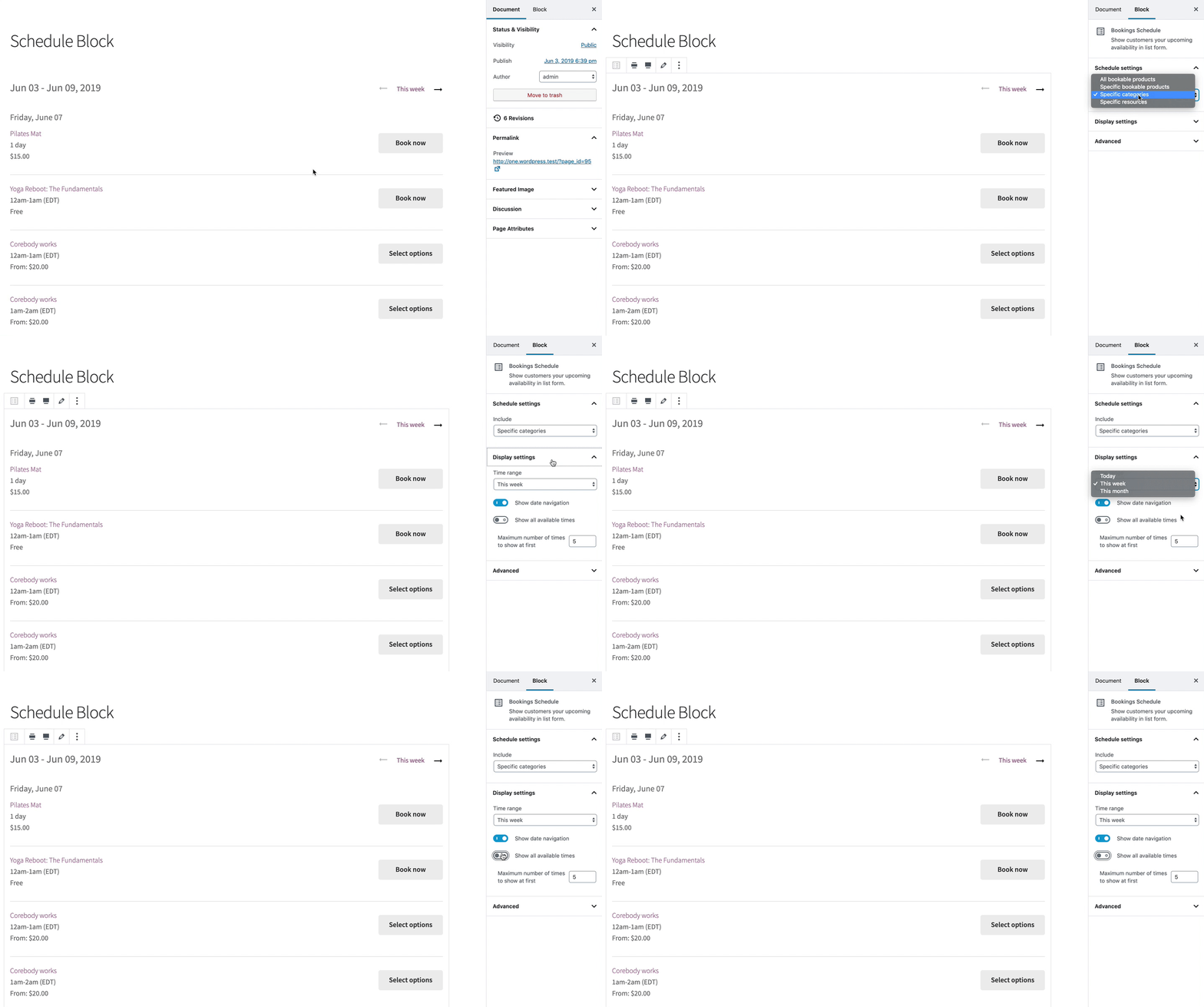
With WooCommerce Bookings Availability, we empower you to showcase available booking slots effortlessly. Together, let's transform your site into a dynamic reservation hub. Highlight open dates, attract customers, and optimize your schedule. This plugin, a boon for businesses, ensures seamless user experiences, enhancing both visibility and efficiency. Embrace this tool, and watch your bookings flourish.

How to download WooCommerce Bookings Availability

Unlimited Access

Subscribe for only €10.90

Or

Get this product only with unlimited updates

Already included languages : EN

We are not affiliated with WooCommerce Bookings Availability nor its developers or owners. Please read the full disclaimer in footer.

HOW IT WORKS

Auto updates with Club WPress plugin

Check how to install and update your WordPress plugins and themes in ONE CLICK directly from your Dashboard.

ClubWordPress Updater Plugin

Core Features of WooCommerce Bookings Availability

  • Flexible Availability Rules: Set custom availability rules for your bookings, allowing you to define when products or services can be booked.
  • Multiple Availability Options: Offer a variety of booking options, such as daily, weekly, or monthly availability.
  • Calendar View: Display availability in a calendar format, making it easy for customers to see open slots.
  • Time Slot Management: Create and manage specific time slots for bookings, ensuring precise scheduling.
  • Blackout Dates: Set blackout dates to prevent bookings on specific days, such as holidays or maintenance periods.
  • Global Availability Settings: Apply availability settings globally across multiple products or services.
  • Customizable Booking Durations: Allow customers to book for varying durations, from hours to days.
  • Integration with WooCommerce Bookings: Seamlessly integrates with WooCommerce Bookings to enhance booking capabilities.
  • Easy Management: Manage all availability settings from a centralized dashboard within WordPress.
  • Responsive Design: Ensure that availability displays correctly on all devices, including mobile and tablet.

List of improvements in WooCommerce Bookings Availability version 1.4.0

  • 2026-07-06 version 1.4.0
  • Add Enhance event calendar accessibility with keyboard navigation as well as screen reader alert for calendar loading status.
  • Add Add accessible aria-labels to booking buttons and event items for improved screen reader support.
  • Update Important: Updated the frontend UI in the Bookings Calendar and Schedule blocks to improve accessibility.
  • Update Reimplement calendar with semantic HTML table structure for improved accessibility and layout.
  • Fix Mobile Load More button now properly resets pagination when selecting different dates in Bookings Calendar Block.
  • Fix Treat the `night` duration unit the same as `day` in calendar availability checks, ensuring accommodation products display correctly in the Week and Month views.
  • Fix Improved keyboard accessibility for event calendar item popovers.
  • Fix Replace button elements with anchor tags for navigation links to improve semantic HTML and accessibility compliance.
  • Fix Add visible focus outlines to bookings availability navigation elements for improved keyboard accessibility.
  • Fix Update color values for bookings availability components to improve accessibility.
  • Fix Update date display in event item component from a span to an h2 for better semantic structure.
  • Fix Display events grouped by date to improve accessibility.
  • Fix Ensure the “Load more” button has the proper button role by replacing the link with a button.
  • Fix Improve accessibility of calendar navigation by using proper button elements with disabled attribute instead of links with CSS-only disabled state.
  • Fix Disable past dates in the booking calendar.
  • Fix Add word-break property to calendar day item title for better text handling.
  • Fix Update calendar date colors to improve accessibility and contrast.
  • Fix Manage focus correctly for when more items are loaded in the Bookings Schedule block.
  • Dev Refactor placeholder mixin in SCSS, remove duplicate, fix misspelling.
  • Dev Upgrade Node.js from v20 to v24 and npm from v10 to v11.
  • Dev Upgrade npm and Composer dependencies.
  • Dev Add a spell-check GitHub Actions workflow and fix typos.
  • Dev Bump WooCommerce “tested up to” version 10.9.
  • Dev Bump WooCommerce minimum supported version to 10.7.
  • 2026-04-20 version 1.3.6
  • Dev Bump WooCommerce “tested up to” version 10.7.
  • Dev Bump WooCommerce minimum supported version to 10.5.
  • Dev Bump WordPress “Tested up to” to 7.0.
  • Dev Bump WordPress minimum supported version to 6.8.
  • Dev Bump the `plugin-check-action` GitHub Action version to v1.1.5 to fix the runner path failure.
  • 2026-02-02 version 1.3.5
  • Dev Bump WordPress “tested up to” version 6.9.
  • Dev Bump WooCommerce “tested up to” version 10.5.
  • Dev Bump WooCommerce minimum supported version to 10.3.
  • 2025-10-20 version 1.3.4
  • Dev Bump WooCommerce “tested up to” version 10.3.
  • Dev Bump WooCommerce minimum supported version to 10.1.
  • Dev Run PHP Compatibility sniffs against entire production code base.
  • Dev Update PHP Compatibility sniffs to development version containing the key PHP 8.4 sniffs, ensuring we are compatible with PHP 8.4.
  • Dev Updates to our QIT GitHub Action workflow.
  • Dev Add new deploy workflow.
  • 2025-08-11 version 1.3.3
  • Dev Bump WooCommerce “tested up to” version 10.1.
  • Dev Bump WooCommerce minimum supported version to 9.9.
  • Dev Bump WordPress minimum supported version to 6.7.
  • Dev Update NPM packages to fix security issues.
  • 2025-07-10 version 1.3.2
  • Fix Address issues with blocks not rendering as expected.
  • Dev Bump WooCommerce “tested up to” version 10.0.
...
>

Join Club WPress Now !

Get access to 19644 products for only €10,90 per month.

JOIN NOW

Reviews