




WebinarPress Pro: The Ultimate WordPress Plugin for Webinars
In today’s digital age, webinars have become an essential tool for businesses, educators, and influencers to connect with their audience. Whether you’re hosting a live event, an online course, or a product demonstration, having the right tools can make all the difference. One such tool is WebinarPress Pro, a powerful WordPress plugin designed to streamline the process of creating and managing webinars. In this article, we’ll delve into the features, benefits, and how to get started with WebinarPress Pro.
What is WebinarPress Pro?
WebinarPress Pro is a premium WordPress plugin that allows users to create, manage, and host webinars directly from their WordPress website. It offers a range of features that make it easy to set up and run webinars, whether they are live, automated, or on-demand. With its user-friendly interface and robust functionality, WebinarPress Pro is designed to cater to both beginners and experienced users.
Key Features of WebinarPress Pro
WebinarPress Pro comes packed with a variety of features that make it a standout choice for anyone looking to host webinars. Here are some of the key features:
- Easy Integration: Seamlessly integrates with your WordPress site, allowing you to manage everything from a single dashboard.
- Live Webinars: Host live webinars with real-time interaction, including chat, polls, and Q&A sessions.
- Automated Webinars: Set up automated webinars that run on autopilot, perfect for evergreen content.
- On-Demand Webinars: Allow users to access webinars at their convenience with on-demand options.
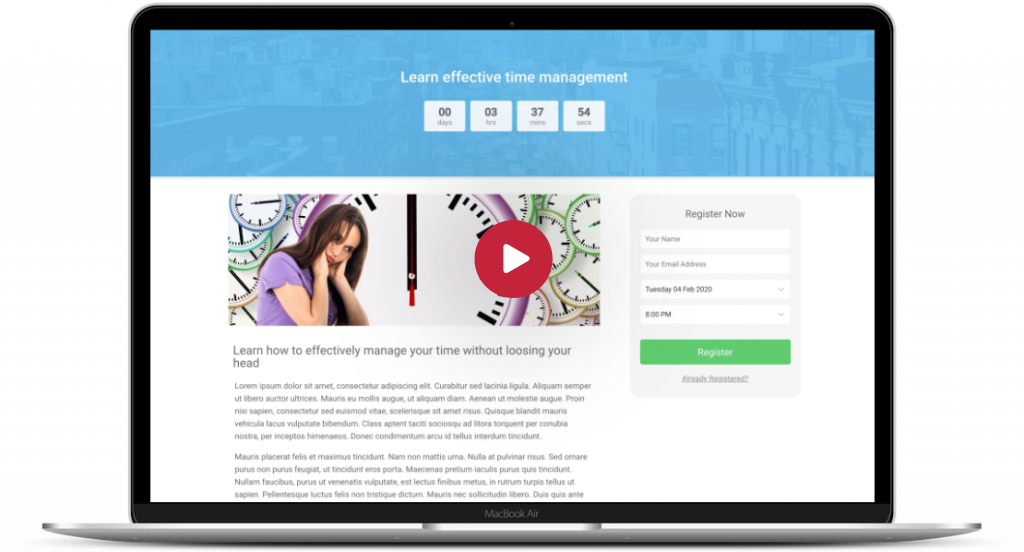
- Customizable Registration Pages: Create attractive and customizable registration pages to capture leads.
- Email Notifications: Send automated email reminders and follow-ups to keep attendees engaged.
- Analytics and Reporting: Track webinar performance with detailed analytics and reports.
- Integration with Email Marketing Tools: Integrate with popular email marketing tools like Mailchimp, AWeber, and more.
- Replay Options: Provide replay options for attendees who missed the live event.
- Responsive Design: Ensure your webinars look great on all devices, including desktops, tablets, and smartphones.
Benefits of Using WebinarPress Pro
Using WebinarPress Pro offers numerous benefits that can enhance your webinar experience and drive better results. Here are some of the main advantages:
- Increased Engagement: Interactive features like live chat, polls, and Q&A sessions help keep your audience engaged and active throughout the webinar.
- Lead Generation: Customizable registration pages and email notifications help capture and nurture leads effectively.
- Time Efficiency: Automated webinars save you time by running on autopilot, allowing you to focus on other important tasks.
- Flexibility: Offer live, automated, and on-demand webinars to cater to different audience preferences and schedules.
- Professional Appearance: Customizable templates and responsive design ensure your webinars look professional and polished.
- Data-Driven Decisions: Detailed analytics and reporting provide insights into webinar performance, helping you make informed decisions.
- Seamless Integration: Integration with email marketing tools and other plugins ensures a smooth workflow and better audience management.
Getting Started with WebinarPress Pro
Setting up WebinarPress Pro is straightforward, even for those new to WordPress plugins. Follow these steps to get started:
1. Install and Activate the Plugin
First, you need to purchase and download the WebinarPress Pro plugin from the official website. Once you have the plugin file, follow these steps:
- Log in to your WordPress dashboard.
- Navigate to Plugins > Add New.
- Click on the Upload Plugin button at the top of the page.
- Choose the WebinarPress Pro plugin file you downloaded and click Install Now.
- Once the installation is complete, click Activate Plugin.
2. Configure the Plugin Settings
After activating the plugin, you’ll need to configure the settings to suit your needs. Here’s how:
- Go to the WebinarPress tab in your WordPress dashboard.
- Click on Settings to access the configuration options.
- Customize the settings, including email notifications, registration page templates, and integration options.
- Save your changes once you’re satisfied with the configuration.
3. Create Your First Webinar
With the plugin configured, you’re ready to create your first webinar. Follow these steps:
- Navigate to the WebinarPress tab and click on Add New Webinar.
- Choose the type of webinar you want to create: live, automated, or on-demand.
- Fill in the webinar details, including the title, description, date, and time.
- Customize the registration page and email notifications as needed.
- Click Publish to make your webinar live.
4. Promote Your Webinar
Once your webinar is live, it’s time to promote it to your audience. Here are some effective ways to do so:
- Email Marketing: Send email invitations to your subscribers and use automated reminders to keep them engaged.
- Social Media: Share your webinar on social media platforms to reach a wider audience.
- Blog Posts: Write blog posts related to your webinar topic and include a call-to-action to register.
- Collaborations: Partner with influencers or other businesses to co-host and promote your webinar.
Tips for a Successful Webinar
Hosting a successful webinar requires careful planning and execution. Here are some tips to help you make the most of your WebinarPress Pro plugin:
- Plan Ahead: Outline your webinar content and create a detailed agenda to stay organized.
- Engage Your Audience: Use interactive features like polls, chat, and Q&A sessions to keep your audience engaged.
- Practice: Conduct a dry run to familiarize yourself with the platform and iron out any technical issues.
- Promote Early: Start promoting your webinar well in advance to give your audience ample time to register.
- Follow Up: Send follow-up emails to attendees with a thank-you note and additional resources.
Conclusion
WebinarPress Pro is a powerful and versatile WordPress plugin that simplifies the process of creating and managing webinars. With its range of features and user-friendly interface, it caters to both beginners and experienced users. By leveraging WebinarPress Pro, you can increase engagement, generate leads, and deliver professional webinars that leave a lasting impression on your audience. So, if you’re looking to take your webinars to the next level, WebinarPress Pro is definitely worth considering.


