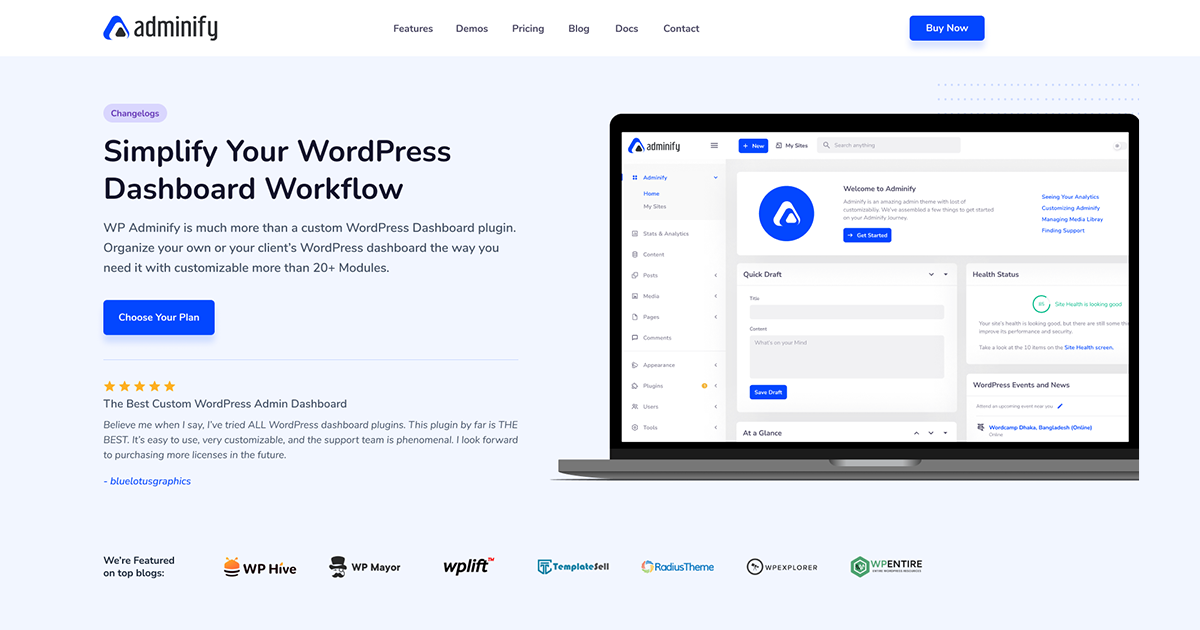
WP Adminify est un plugin innovant, conçu pour optimiser votre expérience WordPress. Avec ses fonctionnalités intuitives, il vous permet de personnaliser votre tableau de bord, d'améliorer la vitesse et d'ajouter des modules utiles. Simplifiez votre gestion, gagnez du temps, et transformez votre interface en un espace de travail élégant et efficace. Essayez-le, vous serez conquis.
Comment télécharger WP Adminify
Accès illimité
Obtenez WP Adminify et 19616 autres produits en vous inscrivant au Club
Tableau de bord personnalisé : Personnalisez le tableau de bord WordPress avec des widgets et des options de mise en page.
Gestion des menus : Réorganisez et personnalisez les éléments du menu d’administration pour une navigation simplifiée.
Contrôle des rôles : Gérez les permissions et les rôles des utilisateurs pour un accès sécurisé et contrôlé.
Notifications : Configurez et personnalisez les notifications pour rester informé des mises à jour et des changements importants.
Personnalisation de l’apparence : Modifiez l’apparence de l’interface d’administration avec des thèmes et des couleurs personnalisés.
Optimisation des performances : Améliorez la vitesse et l’efficacité de l’administration avec des outils d’optimisation intégrés.
Widgets personnalisés : Ajoutez et gérez des widgets personnalisés pour enrichir le tableau de bord.
Gestion des pages et des publications : Simplifiez la gestion des pages et des publications avec des outils de tri et de filtrage avancés.
Intégration avec des plugins tiers : Assurez la compatibilité et l’intégration avec d’autres plugins populaires pour une fonctionnalité étendue.
Support et mises à jour : Bénéficiez d’un support technique et de mises à jour régulières pour garantir la sécurité et la performance.
Quoi de neuf (Journal des modifications - Changelog) dans WP Adminify version 4.2.18
= Ai-je besoin de compétences en codage pour l’utiliser ? =
Aucun codage n’est nécessaire. Adminify propose une interface de réglages point-and-click. Des champs CSS et JavaScript personnalisés sont disponibles pour les développeurs qui souhaitent un contrôle supplémentaire.
= Comment obtenir du soutien ? =
[Contact us here]( Les utilisateurs Pro bénéficient d’un support prioritaire.
= Où dois-je signaler les bugs de sécurité trouvés dans ce plugin ? =
Veuillez signaler les bugs de sécurité détectés dans le code source de ce plugin via le [Patchstack Vulnerability Disclosure Program]( L’équipe Patchstack assistera à la vérification, à l’attribution des CVE et à la notification des développeurs du plugin.
== Code source ==
Ce plugin utilise des fichiers JavaScript et CSS compilés et minifiés, construits avec webpack et npm.
Le code source complet non minifié est disponible publiquement à l’adresse : **
Pour construire à partir du code source :
1. Cloner le dépôt
2. Exécuter ‘npm install’
3. Run ‘npm run build’
== Services externes ==
Adminify repose sur les services tiers / externes suivants. Chaque entrée décrit ce qu’est le service, quelles données sont envoyées, quand cela se produit, et renvoie aux conditions d’utilisation et à la politique de confidentialité du fournisseur.
**Freemius**
Adminify utilise le SDK Freemius pour gérer les licences et mises à jour des plugins (et, pour la version premium, la gestion des comptes). Valider une licence ou vérifier les mises à jour envoie votre clé de licence, URL du site, détails de base de l’environnement (versions WordPress et PHP) et la version plugin à Freemius. Toute donnée d’utilisation anonyme n’est partagée que si vous choisissez de vous engager.
Déclenché : lors de l’activation, actions de licence et vérifications de mise à jour.
C’est DÉSACTIVÉ par défaut. Ce n’est que si un administrateur de site s’inscrit explicitement en cliquant sur « Permettre » dans l’avis administrateur « Ce que nous collectons » qu’Adminify envoie à l’administrateur une adresse e-mail ainsi que des informations de base non sensibles du site (par exemple la version WordPress, les plugins actifs et le nom du site) pour nous aider à comprendre comment le plugin est utilisé et à l’améliorer. Rien n’est envoyé à moins que vous ne choisissiez de participer.
Données envoyées : email administrateur et informations de base sur le site — seulement après avoir cliqué sur « Autoriser ».
Déclenché : uniquement sur l’option explicite « Autoriser » ; Jamais automatiquement.
Lorsque vous sélectionnez une police Google et enregistrez les paramètres Adminify, le plugin télécharge les fichiers de police choisis depuis Google afin qu’ils puissent être servis localement depuis votre propre site (meilleure confidentialité et performance). Cela n’arrive que lorsque vous sauvegardez les paramètres avec une police Google sélectionnée.
Données envoyées : la famille de polices et les poids demandés via un HTTP GET standard vers Google Fonts. Aucune donnée personnelle n’est envoyée.
Déclenché : lorsque vous sauvegardez les paramètres d’Adminify avec une police Google sélectionnée.
[Google Terms]( | [Google Privacy Policy](
== Captures d’écran ==
1. Le panneau principal des paramètres d’Adminify, le centre de contrôle pour toutes les options de personnalisation.
2. L’éditeur de menus d’administration à glisser-déposer en action.
3. L’interface de personnalisation de la page de connexion (Loginfy).
4. Paramètres de sécurité administrateur WordPress : URL de connexion personnalisée, redirections, et plus encore.
5. Dossiers de bibliothèque média organisant les fichiers avec un système de dossiers glisser-déposer.
6. La page de paramètres White Label montrant les options de branding du pied de page administratif.
7. La page des paramètres du module montrant les modules complémentaires disponibles tels que les journaux d’activité.
== Journal des modifications ==
= Adminify 4.2.18 (07-09-2026) =
Corrigé : cliquer sur « Modifier avec Elementor » dans l’éditeur de blocs n’a rien fait et vous a maintenu sur la même longueur d’onde ; il vous amène maintenant à l’éditeur Elementor.
Corrigé : L’Assistant de configuration s’ouvre maintenant quand vous cliquez dessus dans le menu, et n’affiche plus de message d’avertissement sur la page.
Corrigé : L’option qui masque l’avis « mise à jour PHP requise » le cache maintenant en fait.
= Adminify 4.2.17 (07-02-2026) =
Corrigé : Les modifications que vous faites au menu compte (le menu « Salut ») apparaissent désormais correctement dans l’admin Adminify : masquer les éléments, les renommer, les limiter à certains rôles utilisateurs et ajouter vos propres éléments du menu fonctionnent tous comme prévu.
Corrigé : Les éléments de votre propre menu de compte sans icône n’affichent plus une lettre aléatoire à côté.
Corrigé : Le menu compte se ferme maintenant correctement lorsque vous cliquez ailleurs sur la page après être passé à une autre page.
Corrigé : La barre de recherche fonctionne désormais de manière fiable.
Corrigé : Le logo s’affiche désormais correctement dans l’éditeur de blocs.
= Adminify 4.2.16 (24-06-2026) =
Sécurité : Le téléchargement du logo de l’assistant de configuration renforcé valide l’URI des données, décode strictement la charge utile base64, édulcorait le nom du fichier, impose une liste d’attribution par type d’image (jpg/jpeg/png/gif/webp), et stocke désormais le logo comme une pièce jointe de bibliothèque média appropriée.
...
>
Rejoignez le Club maintenant !
Accédez à 19616 produits pour seulement €10,90 par mois.
Avec OxyProps, nous enrichissons notre expérience de création de pages sur WordPress. Ce plugin, compagnon ultime, nous offre des outils puissants, des fonctionnalités...
Nous utilisons des cookies pour vous garantir la meilleure expérience sur notre site web. En continuant la navigation sur ce site, vous accepter leur utilisation.